


Online Markup Calculator
Our Markup Calculator helps you determine the ideal selling price for your products to ensure profitability. By entering your cost and desired markup percentage, you can instantly see your gross profit and final price. This tool is essential for business owners, wholesalers, and e-commerce sellers.
Pricing Strategy
Calculation Examples
Example: Setting a 50% Markup
Cost Price: $100 | Markup: 50%
Result: Selling Price = $150. Profit = $50.
Calculation: $100 + ($100 * 0.50) = $150. Note that a 50% markup results in a 33.3% profit margin.
Example: Wholesale Pricing
If your manufacturing cost is $20 and you want a 25% markup for bulk orders, the tool will show a selling price of $25 per unit.
Visual Interface Example:
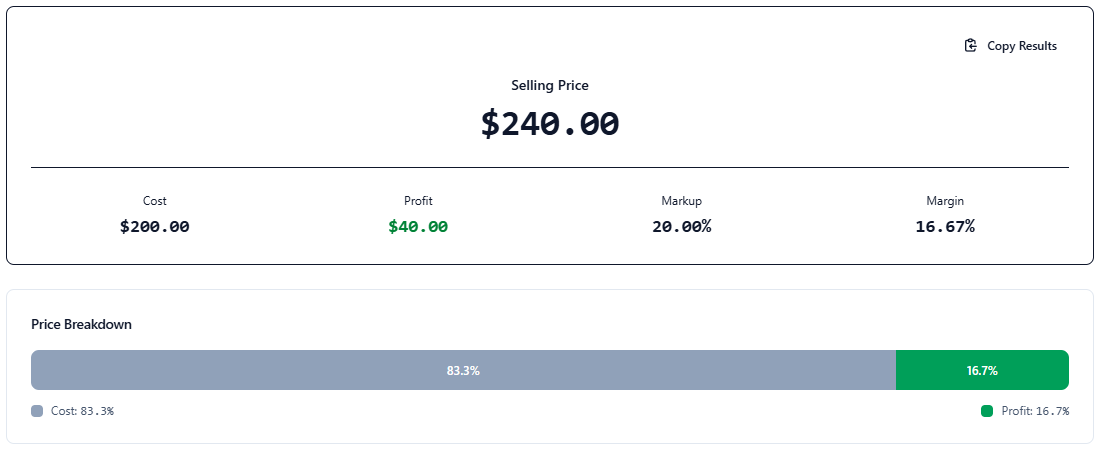
How to Calculate Markup?
Markup is the difference between the cost of a product and its selling price, expressed as a percentage of the cost. It is a fundamental metric for any business to cover operating expenses and generate net profit.
The Markup Formula
To find the markup manually, use the following formula:
Markup = [(Selling Price — Cost) / Cost] * 100
Markup vs. Margin: What’s the Difference?
While often used interchangeably, they are different:
- Markup: Shows how much more you sell a product for than it cost you (based on cost).
- Margin: Shows how much of the selling price is profit (based on revenue).
Understanding this distinction is vital for accurate accounting. You can read more about it on Markup (Wikipedia).


